
TL;DR:Building an agent starts with one question: how does it talk to the world? Text in, text out — and everything else is just a plugin.
I lost my wisdom teeth today, so let’s make it simple…
What is IO for an Agent?
IO defines how your agent system can explore or communicate with its external environment.
It’s not a real human — it won’t see, smell, or feel. Anything going in to the agent, and anything coming out, is plain bits.
Here’s the bare minimum IO you need for an agent:
- Text input
- Text output
That’s it. You can build a lot with just that.
Processors: Not Just Neural Nets
Before machine learning took over, processors were rule-based. Believe it or not, these systems still run today — when you call your bank and hear “Press 1 for balance, Press 2 for transfers,” that’s a rule-based agent. I’ll cover that section later. For now, let’s focus on IO.
Multimodal: Making IO Cooler
Want to go beyond text? “Multimodal support” just means your IO bus handles more data types. Video, image, voice — these are already solved problems:
- Image viewer
- Video player
- MP3 player
- Microphone input drivers
- Image transformer
None of these are new. They’ve been around for decades, and they perfectly meet agent needs. The trick is making your IO bus generalized — built to accept more input types via plugins over time.
Think about where this goes: agents will soon have physical bodies. IoT sensors will feed into the same IO bus. The abstraction that handles voice today will handle temperature sensors tomorrow.
Design Principle: Generalize Your IO Bus
Don’t hardcode IO types. Build a plugin-friendly bus where new input/output channels can be added without touching core agent logic.
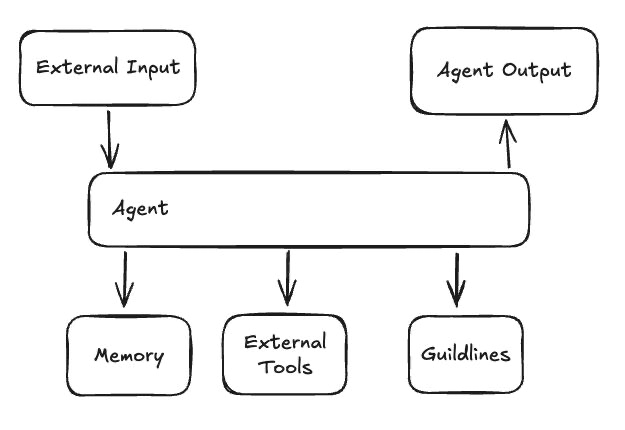
Your agent’s intelligence lives in the middle. The IO bus is just plumbing — but design it well and you only build it once.
GitHub
Full implementation at github.com/Czhang0727/agent-from-scratch.
Part 2 covers orchestration — once IO is hooked up, how do you get the model to actually do things?
Auth_Verified: 2026.04.10